GitHub Actions: Trigger Custom Workflows
Configure Workflows to Run One or More Events
What is GitHub?
- Collaborative developer platform
- Public and Private Repos
- Free, Pro, Team, Enterprise
- Home of GitHub Copilot
- Source Code Control
- CI/CD Automation
- Package Management
- Collaboration
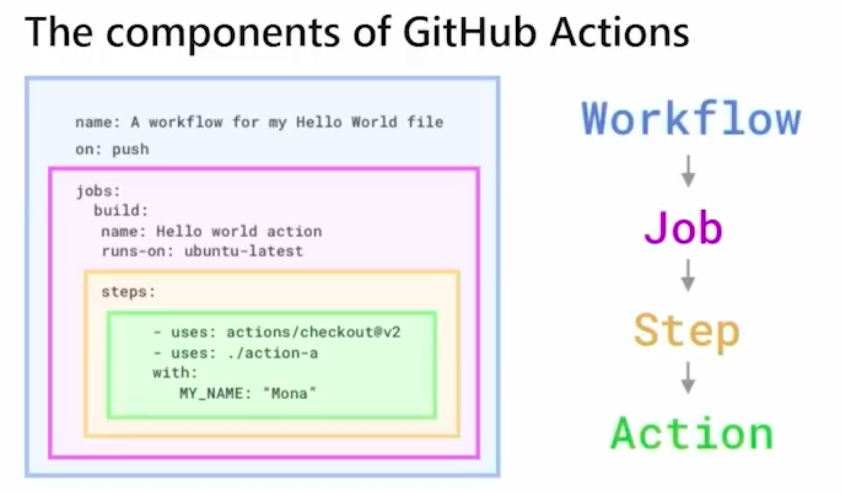
What is GitHub Actions?
- Entire platform and ecosystem for creating and running automated workflows within the GH Environment
- An action is a script invoked from within a workflow
What are Workflows?
- Automated scripts (actions) that run when specific events occur within a repo
- Efficient way to automate development tasks
- Common use cases:
- CI/CD
- Versioning and release management
- Automation and notifications
GitHub Workflow Event Types
- Push Events
- Pull Request Events
- Issue Events
- Release Events
- Workflow dispatch events (manual)
- Scheduled Events
- Webhook Events (external services)
Trigger Workflow when Commit is Pushed
- Workflow runs when a new commit is pushed to a specific branch or repo
- Use cases:
- Running tests after every push
- Deploy code and infrastructure to a staging environment
on:
    push:
        branches:
            - main
            - develop
Configure Workflows to Run for Scheduled Events
Scheduled-Based Workflow
- Workflows run automatically at specific times or intervals
- Use cases:
- Running nightly builds
- Performing hourly backups
on:
    schedule:
        - cron: '0 0 * * *' # Every day at midnight
Configure Trigger Custom Workflows
Manual Workflows
- Workflow runs only when manually triggered by a user
- Use cases:
- Deploying to a production environment
- Running a one-time automation script
on:
    workflow_dispatch:
Configure Workflows to Run for Webhook Events
Webhook-Triggered Workflows
- Workflow runs when triggered by an external event from another service
- Use cases:
- Triggering a build when a new issue is created on GitHub
- Deploying code to a server when a new version is released
on:
    webhook:
        url:https://example.com/my-webhook
Demonstrate a GitHub Event to Trigger a Workflow Based On a Practical Use Case
A Practical Example
Scenario: Automatically deploy a website to Netlify every time a new commit is pushed to the main branch Implementation: Push a new workflow to the GitHub repo; whenever you push a new commit to main, the workflow will automatically deploy the website to Netlify
on:
    push:
        branches: [main]

jobs:
    deploy:
        runs-on: ubuntu-latest

        steps:
            - uses: actions/checkout@3
            - name: Install dependencies
                run: npm install
            - name: Build website
                run: npm run build
            - name: Deploy to Netlify
                uses: netlify/actions/cli@v1.1
                with:
                    site_id: your_netlify_site_id
                    api_key: your_netlify_api_key
                    args: deploy --prod
branches: [main]: Deploy workflow when a push is made on the branchmainruns-on: ubuntu-latest: Runner that runs the following stepsuses: actions/checkout@3: GitHub hosted action
The GitHub Marketplace contains all of the available hosted actions
Actions are stored in a repo’s .github/workflows directory